A field manual for the day
Wake up when you said you would.
Alarms, sleep, habits, focus, and reflection — one quiet system for the promises you make to yourself.
Free · Android APK · No account
What it is / what it is not
A quiet system for the promises you make to yourself.
- 01 Works offline Core tools, no connection
- 02 No account Open it and start
- 03 No ads Nothing to dismiss
- 04 Local data Stored on your phone
An alarm you have to answer.
When it rings, the tone loops. A snooze limit and a wake-up challenge stand between you and the day.
Interface recreation / wake-up challenge
Interface recreation / sleep plan
A bedtime you can keep.
Set the target, get a wind-down cue, and log the night without turning it into homework.
Small things, kept.
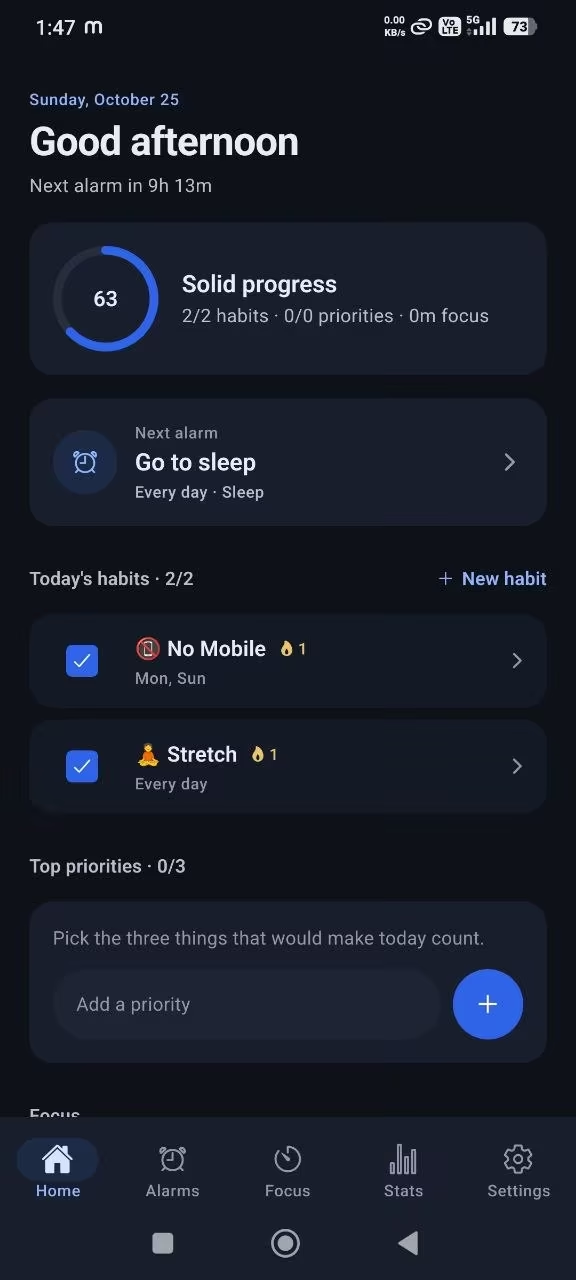
Check in on the habits that matter. The streak and weekly score show what is holding — without a guilt screen.

Interface recreation / focus session
One task. One clock.
Start a session, leave the app if you need to, and get a notification when the time is up.
End the day honestly.
Rate the day, write what went well, and name what you skipped. Three minutes, no judgement.
Interface recreation / evening reflection
Method / three decisions
A day has a shape.
Set the terms once. The app holds them quietly, then shows you the week.
- 22:30 01
Set the terms.
Choose a wake time, a bedtime, and the habits that make a day count.
- 05:30 02
Meet the alarm.
Solve the challenge, check in, then start the first focus session.
- 21:45 03
Read the week.
Reflect on what held, what slipped, and change one thing.
Privacy / local-first
Nothing leaves your phone.
Disciplin keeps its database in the app’s private sandbox. No login, no cloud sync, no analytics SDK.
Uninstall the app and the local data goes with it.
Read the privacy policyFAQ / straight answers
Questions, answered.
Including the one most alarm apps avoid: what happens when the app is closed.
Is Disciplin free?
Yes. The Android APK is free. There is no account, subscription, or advertising. You download it, open it, and start.
Does it work offline?
Yes. Alarms, sleep, habits, focus, and reflection work from the local database without a connection. Downloading the APK or an update needs the internet.
Do alarms ring when the app is closed?
On Android, the system can deliver a scheduled alarm notification with one selected tone while the app is closed. The looping ringtone, full-screen alarm, and wake-up challenge need the app open or the notification tapped.
Keep the app installed and open it at least once a week so upcoming alarms stay fresh. Allow exact alarms when Android asks.
Where is my data stored?
In a SQLite database inside the app’s private sandbox on your phone. It is not uploaded to us. Uninstalling Disciplin removes the local data.
Do I need an account?
No. There is no sign-up, login, or email required. There is also no cloud sync, so your data lives on the device you use.
What makes the alarm hard to ignore?
When the alarm opens, the ringtone loops until you dismiss it. You can limit snoozes and require a math answer or a press-and-hold challenge before the sound stops.
End of manual / 23:10
Tomorrow starts tonight.
Set the bedtime. Charge the phone. Put it down.
Free · Android · No account